Author: Peter Hyde at WebCentre
Reproduced in HTML format by Jack Cane,
ENW International, Ltd.
Contents
INTRODUCTION
QUICK TOUR
ARCHITECTURE
DATABASE SUPPORT
BUILT-IN SAVE STATE AND SURFER TRACKING
DYNAMIC HTML
THE TEN-MINUTE WEB SITE
THE COMPLETE WEB SITE
KNOW THY SURFER, KNOW THY SITE
REMOTE ADMINISTRATION
DETAILS, DETAILS
D-DAY PLUS ONE (OR: LIMITS? WHAT LIMITS?)
The Web is one of the most challenging and exciting development environments. It also has the most pitfalls for the unwary.
In 1995, HREF Tools Corp. brought to market a product known as WebHub, the first
comprehensive web application framework for creating reliable, high-perfomance, dynamic
web sites with re-useable html and program logic.
Today WebHub is being deployed by hundreds of
corporations and large organizations around the world
for sophisticated database-driven Internet and Intranet
systems.
The architects of WebHub sought to provide a powerful framework that would solve
critical web-related issues within an entirely flexible and extensible development
environment. At the time of WebHub's development, few Web developers had canvassed
critical issues such as
- peak load behavior
- high-performance database access
- persistence of surfer data by saving state
- scalability
- separation of page design from program logic.
The objective of this paper is to outline the ways in which WebHub has tackled these
and many other mission-critical requirements, making it the best Web development tool
available in the market today.
QuickTour - a note from Jack Cane
|
top |
This White Paper has existed for some time as a RichText document, readily downloadable and
readable in MS Word or any other rtf reader. We at ENW International, Ltd.,
being recent WebHub converts, thought it would be useful to have this document available as HTML.
On the twin assumptions that (1) not all readers have sufficient time to read through
the entire 30-page document and (2) the "good parts" are distributed throughout
the text, we thought that some readers might benefit by following this list of hyperlinks
for a quick overview: The text is literally a part of the full document, but you will be
pointed to a series of hyperlinks to speed you through an initial review of this excellent
document.
To follow the tour, just continue reading as desired, and click on the 'QuickTour: Continue'
hyperlinks when you find them. All links move you forward in the document.
Every Web application has the following features in common (see Figure One):
- A user (or "surfer") uses a Web browser to connect via TCP/IP with the web
server. Surfer makes page requests and submits forms using this connection.
- The web server can serve static pages and other information, but in the case of dynamic
sites it will usually pass the request through a Server interface to the Web Application.
- The web application interprets the information passed to it through the Server
interface, optionally interrogates a Back-end system (such as a client/server database),
and generates the desired HTML results for passing back to the Server interface.
- The web server receives the resulting HTML and sends it back to the surfer's browser,
where it is displayed.
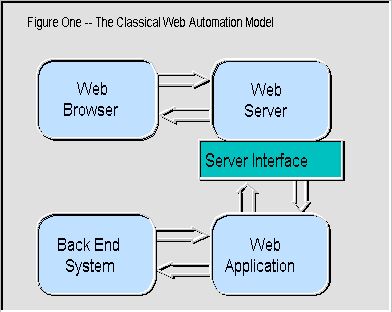
What this classical model obscures is the complexity involved in managing both the
server interface, which can vary significantly from server to server, and the effects of
high traffic or slow back-end response times on a Web site.
Figure Two expands on the common model to show WebHub's architecture, designed to overcome
both problems at once. The three key innovations are:
- The Runner, which provides a seamless server-specific
connection between a WebHub application and any supported server. In effect, by using the
runners provided with WebHub, developers can completely bypass the need to consider what
server will be used to deploy their site. Servers can be swapped when you move from
testing to deployment, after deployment, or even "live" in a site which hops
from one server to another during a surfer's session.
- The Hub, which provides bulletproof surfer request queuing
and also acts as a manager for the Web applications deployed on the site. In conjunction
with the Runner, the Hub also implements the basic surfer identification and tracking
mechanisms which make "save state" and several other advanced features possible.
- The Web Application, which is now freed from concerns
about server interfacing or request management, and simply needs to implement the page
generation and Back End System interface logic on a "one request for one surfer at a
time" basis.

QuickTour: Continue
The WebHub components and example code are all related to building the Web application
logic itself — the Runner and Hub have taken care of the rest. Instead of writing
code to manage request queuing, or to interact with a given server interface, you'll be
using the components to interpret the information provided by the surfer - during their
entire session, not just for the current request - and producing the appropriate response.
The full potential of this architecture is seen very early on in the development
process. For example, instead of trying to debug complex thread-safe DLLs which can crash
the entire Web server when an error occurs, WebHub developers can do their development and
live debugging right in the Delphi IDE. Application bugs do not affect the Hub, Runner or
Web server. New versions can be built, deployed and tested in seconds, with no need to
take the server down.
Speed is another direct benefit of the WebHub architecture. Server interfaces such as
CGI-BIN require the entire Web application to be
loaded and unloaded from memory to handle each surfer's request. This creates a huge
overhead for typical Web applications which are several hundred KB (or more) in size. With
WebHub, however, the Web application stays loaded at all times, and only the tiny Runner
is loaded for each request.
More important still, a permanently loaded application can maintain permanent connections
to any back-end services, which can make the difference between milliseconds and tens of
seconds in satisfying a surfer's request.
The Hub can manage different applications, each of which provide different services
required by the site. A truly modular solution is possible because the same surfer
information can be seamlessly shared across and between applications. Apart from the
improvements in program maintainability, this is particularly important when some requests
take significantly longer to service than others. They can be routed to a module built for
that purpose while "regular" requests from other surfers are handled by less
time-intensive modules.
The result is that other surfers are able to have their requests serviced even though
one surfer may have requested information which would otherwise tie up the entire system
for many seconds.
The final, crucial benefit that arises from WebHub’s architecture is scalability.
As well as handling different applications, the Hub is able to manage multiple running
copies of the same application. In effect, it allocates the next surfer’s request to
a copy of the application which is not already busy satisfying an earlier request. This
doesn't require special forethought or coding in the applications — as far as each
copy is concerned, it may as well be the only application running on the system.
Certain operations, such as those requiring persistent database connections, might
require a surfer to always return to the same copy of an application. This, too, is
covered, with the ability to "lock in" a surfer to a particular copy of an
application once the first request has been made.
Scaling-up a site by running more copies of an application on the same server will
almost always help site responsiveness as traffic increases — especially if much of
the time required to deal with each request is actually determined by back-end response
times. However, at some point diminishing returns set in as the server reaches 100% CPU
load.
With other Web development approaches, this would normally be the time to invest in
significantly faster iron, or a total software redesign. With WebHub, easy solutions are
at hand:
- Lessen overall server load, for example by hosting "media" files such as
images, video and sound on a separate server, such as a cheap P90 with a fast disk.
Applications built with WebHub can usually "repoint" after such a shift by
changing a single setting in an INI file — no recompilation required. Better yet,
WebHub includes a "round robin" feature, which can seamlessly switch between
multiple copies of the data on multiple media servers, meaning that the load can be spread
over several machines to support a media-intensive site.
- Share the Web application load by running copies of applications on other servers on the
network, again by simply changing control file settings. WebHub supports this capability
with the concept of the "Maitre d'Hub", which receives the incoming requests and
then directs them to Hubs (and hence applications) running on the other servers. Thus, a
cluster of machines can provide nearly linear scaling of site responsiveness — an
approach which can be extended indefinitely without a moment's redesign of the application
logic itself.
In short, the Runner/Hub/Application architecture used by WebHub provides immense
benefits for Web sites in critical areas such as performance, server independence,
reliability, load sharing, and ease of debugging and scalability.
"Don't be the first site builder on your block to show Tom's data to Dick and
Harry."
WebHub's data access capabilities derive directly from the excellent support that
Delphi has in this area.. All the options offered by the Delphi Client/Server
edition are available to applications built using WebHub, including third-party add-ons
such as Apollo, as long as they support a TDatasource component.
QuickTour: Continue
Thus, a Web application may be presenting or accumulating information contained in a
local Paradox or Access table, or it may be running complex SQL queries against an
enterprise Client/Server back end like Oracle or Interbase.
WebHub applications fit well into the multi-tiered database framework supported by
Delphi 3.0+ — in effect, the Web application becomes a client which presents the
surfer's requests to a remote server tier and then displays the results. The same business
rules developed for other applications accessing the database can thus be applied to the
Web application.
Once again, however, WebHub's implementation of database support has enabled
significant development and performance efficiencies. Naturally, WebHub provides a number
of components like the TwhdbGrid, which can automatically present tabular information
in HTML. These are enhanced by properties to control not only which fields are displayed,
but also the index order of the result. These properties can be set by the developer or
the Webmaster, and can even left open to control by the surfer.
For those who wish to exercise finer control over the display, TwhdbScan provides
the same record-by-record control as the TwhdbGrid, but leaves the generation of each
row's HTML up to the developer — it could then be as readily formatted to be
parameters to some JavaScript as for HTML display itself.
Two major advantages arise from using these components and
their companions.
- The first is that they support automatic "paging" of the results. In other
words, instead of returning 1,000 query result records for
display in a single Web page, these components will automatically display a
surfer-configurable number of rows on each page, providing full navigation, so that the
surfer can step through the result set.
- The second winning feature is that each query is retained and matched against a given
surfer — an approach known as "query cloning". In effect, this means that a
surfer can return to a result set as often as needed during a session. The query will not
have to be rerun unless the query conditions are changed, which means that paging, index
changes and redisplay always work at maximum efficiency against the original result set. This can reduce the page turnaround for the surfer and the load on the
back end by a factor of 10 to 1,000, with no additional programming
required on the part of the developer.
The WebHub components have properties permitting fine control of features such as query
cloning — resource or licensing constraints might mean that there should never be
more than 20 queries open at a time, for example. Once this figure is set, the application
can be deployed with confidence that this limit will be respected, and that the available
query "pool" will be reused as efficiently as possible to service the traffic
levels experienced by the site.
There will never be a case where a surfer ends up staring at someone else's data, even
if "their" query has to be reused because of high traffic. The worst case
scenario, which occurs when their old query has already been recycled, is that the query
will be automatically run again behind the scenes. This is a
scenario which most Web development systems must visit for every single display or
redisplay of query information.
Most database operations on the Web are display-only. A
smaller number of sites also accumulate new information in tables. Very few indulge in
live updates to existing data, perhaps because this feature is all too often thrown into
the "too hard" basket. Not with WebHub.
WebHub provides two ways to automate data display and entry. The TwhdbGrid has
simple property settings which allow one or more grid fields to be editable — whether
you want to output edit fields for text fields, checkboxes, radio buttons or text areas.
Thus, a Web developer need only display the grid in a form and respond to the Submit
button to validate the data and post it back to the database — this is no more work
than would be required for a regular database application.
More importantly, WebHub has a clearly defined system for identifying which record of
which dataset has been updated when the form is submitted. All
too often developers must spend hours or days
designing a way to ensure they don't end up posting the data back to the wrong record.
With WebHub, the information is encapsulated in the form literal returned by the browser,
leaving no room for error.
QuickTour: Continue
As well as supporting data entry in grids, WebHub includes the TwhdbForm component.
This can be called directly from HTML to either display or edit the fields in a given
database record. Once again, when the form is submitted, it includes enough information to
make sure the developer can post it right back where it belongs.
Thus, WebHub builds on the superb database support provided by Delphi with a set of
components which increase site performance and reliability while slashing the effort
required to achieve even "difficult" features such as database posting.
Built-in Save State and Surfer Tracking
|
top |
"Amnesia is a problem for programmers. It's downright terrible for Web
sites."
Most dynamic Web sites quickly trip over a fundamental fact about the Web — unlike
ordinary interactive environments, it is "stateless". This means that every
request made to a Web application will normally have no context. In other words, the
request that a Web application receives at a given moment may be from the same surfer it
was handling just a second ago, or a surfer who hasn't done anything for over 10 minutes.
For anything other than a very trivial application, this is a serious matter. Unless
the Web application knows something of the surfer's previous interactions, how can it
decide what query to use, what page they are up to, what display options have been
previously selected or whether the surfer is even authorized to be on this page?
Because this is such a fundamental problem, various Web development tools have
implemented numerous approaches to deal with it. These include "cookies" (small
files which are saved on the surfer's computer and passed back and forth with each
request) and "hidden form fields" (HTML containing information about the surfer
which is sent out with each page). Both these approaches are subject to major problems
— such as a surfer's refusal to accept cookies, or the ability that some surfers
could have to alter hidden HTML and thus circumvent security.
WebHub tracks individual surfers by assigning each of them a special number (known as a
Session ID) when they first arrive on the site. When this happens, the developer has the
ability to perform additional validation or security handling (such as checking the
surfer's IP number) if desired.
The Session ID is preserved by placing it on the URL, that is, making it part of every
subsequent page request made by that surfer within the site. All information received from
the surfer during a visit to the site is saved and made available to the Web application,
indexed by that number. So long as the Session ID is preserved, the Web application will
never get "lost".
QuickTour: Continue
Preserving the Session ID is easy for the developer — when building pages with
WebHub, normal <A HREF=....> links are replaced with simple macro calls such as JUMP
and BOUNCE. The main effect of these macros is to dynamically generate a link when the
page is sent to the surfer; this link contains the surfer's unique Session ID. When the
surfer clicks on that link, the Session ID comes back to the site as a normal part of the
URL and is interpreted by the WebHub components, which then provide all of that surfer's
information to the Web application.
Here's an example of a link made using a WebHub macro call:
JUMP|OurPage|Jump here please
…and here’s the resulting HTML:
<A HREF="http://yoursite.com/scripts/runisa.dll?APPID:OurPage:123456">Jump
here please</A>
Dissecting this, you will observe:
- The ordinary site URL, up to and including the "runisa.dll" portion, which is
the default name of the WebHub Runner for ISAPI-based servers.
- A question mark — this informs the server that everything that follows is
"parameter" information which should simply be passed through to the Runner
unaltered.
- APPID, which is the optional Application ID—this is how one WebHub installation can
support and address multiple applications — each is given its own unique Application
ID by the developer. The Runner uses this to determine which Web application should
receive the incoming request. It is also possible to set a default application which is
called if the ID is omitted.
- OurPage — the name of the page within the application which is being requested by
this link. The application components will use this to build the page from the HTML and
macros that have been defined for that page.
- 123456 — the Session ID — once we have this, we know not only which
application and which page the surfer wants, but also WHO the surfer is. Note that the
surfer may still be completely anonymous in general terms — the important thing is
that we now have access to everything they have already done during this session at this
site.
Each surfer's session information is saved on the server, either in the Web
application's memory or streamed to disk. This means that the site is not dependent on
surfer-side solutions such as cookies or hidden HTML with all of their inherent problems.
It also means that session information can be shared across applications or even servers,
provided only that it is saved to disk in a common directory.
In effect, a surfer may be "bounced" from module to module or server to
server with each request, depending on what site services are chosen, or how busy the
different applications are. An example of this might be a site which uses an insecure
server for most of its operations, but which bounces to a secure server for processing
order forms. Using WebHub, nothing could be easier.
This automatic sharing of server-side session information is one of the factors
supporting the easy scalability of applications built with WebHub. Above all,
however, the beauty of the WebHub save-state mechanism is that it requires no special
effort to use it — each request which is presented to a Web application is already in
context, with all the surfer's information at hand.
"Be among the first to implement the Constitution in code by maintaining
separation of church (HTML) and state (application logic)."
At the heart of any Web application is the HTML — the simple language that turns
any piece of information that the application provides into something which can be viewed
by the surfer. And therein lies a problem.
Far too many Web tools assume that "heart" means "buried deep
inside". The effect of this is that they wrap the HTML — which governs the look
and feel of the site — inside compiled applications or complex development
environments.
Need to change the opening page? No problem, let's just load up our compiler, its IDE
and Web editor engine, change those three lines and rebuild the lot.
Oh, and don’t forget to take the server down so the changes will
“take".
It could be worse — it is worse. Other tools go to the opposite extreme, by
requiring much or all of the program logic to be coded "between the lines" of
HTML pages, leading to the worst possible kind of spaghetti to maintain — spaghetti
which requires an in-depth knowledge of both HTML and the
programming system.
WebHub was designed with two simple premises in mind:
- the best people to develop and maintain HTML are those who
are skilled in using HTML
- the best people to develop and maintain program logic are
those who are skilled in programming
To live up to this, WebHub makes it possible to keep all of the HTML apart from the Web
application. It lives in text files which an HTML specialist (i.e., the Webmaster) can
alter at any time, using any Web editor. "At any
time" includes "while the application is running."
Alterations can be made to the HTML and carried across into the generated pages at the
push of a button on the server, or by the click of a link from a remote browser.
QuickTour: Continue
Dynamic Web sites do not live by HTML alone, however. There has to be a way for the HTML
specialist to say "place that table there" or "display this input field
showing the previous value the surfer entered." WebHub provides these essential
"hooks" between the HTML and the program logic using an inbuilt, extensible
macro language. Here are some simple fragments:
A welcome page, called EntryPage:
<FORM METHOD="POST" ACTION="(~action|HelloPage~)">
<INPUT NAME="SurferName" VALUE="(~SurferName~)">
<INPUT TYPE="Submit">
</FORM>
The response page for the above form, called HelloPage:
(~requires|SurferName|EntryPage~)
<H2>Welcome to our site, (~SurferName~)!</H2>
EntryPage contains two macros, which are recognizable because each is surrounded by parentils. The first is the "action" macro, which
basically translates the "HelloPage" parameter into a suitable action for this
form — in this case a URL which jumps to the HelloPage, complete with SessionID
information. In the resulting HTML, it would look something like this (refer to the
previous section for a breakdown of the different parts of the URL):
<FORM METHOD="POST"
ACTION="/scripts/runisa.dll?app:HelloPage:123456">
The next macro on EntryPage refers to the SurferName string variable. In effect, this
macro is telling the Web application to place any existing value for the SurferName
string variable into the Value part of the INPUT statement, for example:
<INPUT NAME="SurferName" VALUE="Bill">
This means that Bill won't have to re-enter this information if, for any reason, he
returns to this page later in his session.
The HelloPage response page which appears when the form is submitted has two macros
also. The first, a "requires" macro, doesn't actually generate HTML. Instead, it
checks to see if there is a value assigned to the SurferName string variable at this moment. If
not, the surfer is bounced directly back to EntryPage to enter it properly — and
doesn't see any part of HelloPage. This is one of the many useful security features in
WebHub.
The SurferName string variable is again referenced with a direct macro call, this time to
display it in a welcoming sentence, such as:
<H2>Welcome to our site, Bill!</H2>
From these examples you can get some idea of how macros can be used to reference form
StringVars and to activate particular WebHub features and logic.
This alone leads to a rich and useful dynamic page creation capability, without the
need to write any program code. But there is far more to it. Simple re-useable,
substitution macros can be used, with nesting as necessary, to assign site-wide settings
such as where image files are stored, the webmaster's email address, the site name and
contact details.
More importantly, the same macro syntax can be used to execute (or access the
properties of) most WebHub components. Even better, the developer can create
"WebAction" components for the application which can be called by name, with
parameters, to accomplish particular tasks. It is WebAction components in particular which
make WebHub's macro language extensible.
For example, the HelloPage page above could be extended to call a hypothetical
"LogArrival" component which takes the SurferName and any other relevant form
data and stores them in a special transaction log. The macro syntax to do this would
simply be:
(~LogArrival.Execute|~)
or even just
(~LogArrival~)
WebAction components are one of the pbject classes provided by WebHub. To create the
LogArrival component, the developer needs only to drop a component icon on the form, name
it "LogArrival", hook its OnExecute event and write a couple of lines of code to
take the form StringVars (a readily available property of another WebHub component) and put
them in whatever log is being used — a database, text file, etc.
As usual, the save-state and "one surfer at a time" features of WebHub mean
that the LogArrival component automatically knows what information it is dealing with and
for whom — no special management is required. And if a particular feature is likely
to be needed in future applications, you need only do the following:
- inherit a new component based on WebAction
- drop in the necessary logic
- add it to your component palette!
By documenting particular macros or WebAction component names, an application developer
can give the HTML specialist the means to "reach into" the application to access
specific pieces of logic or functionality. Just as usefully, simple layout-oriented
substitution macros can be defined externally (in the HTML files) where they can be
managed by the HTML artist, but directly used from within the Web application, so that raw
HTML itself need never be present in Delphi code.
The direct benefit of using the WebHub macros and WebAction components to keep the HTML
separate from the logic is that a site becomes extraordinarily amenable to team
development, and just as easy to maintain, without any need for Delphi code changes or
recompilation. In fact, major changes can often be made — remotely or directly on the
server — without even shutting down the Web application!
WebHub has one more ace up its sleeve in the area of HTML management, which is the
concept of reusable HTML "droplets". The key word here is "reusable".
Most finished Web pages consist of several independent sections — a simple page will
usually have at least a header, a body and a footer. Very frequently the header and footer
do not change (or change only slightly) from one html page to another.
Instead of repeating such information on every page, WebHub allows pages to be built up
from reusable droplets. A header droplet might have the page title and background information,
perhaps a logo and some navigation elements. A footer droplet will typically have navigation
and contact information. Both might have some information which should only appear on
certain pages — its appearance (or otherwise) is readily controlled by conditional
WebHub macros.
Other reusable droplets might be particular reports, forms (such as a search engine input
field) or even client-side automation such as JavaScript. Any number of droplets can be used
to build a page, nesting is fine, and conditional macros can be used to dynamically decide
whether a particular droplet should be in or out of a page being built for the current
surfer.
The advantage of having only one copy of a commonly-used piece of HTML to maintain
should be readily apparent. Once again, both site development and long-term site
maintenance will benefit substantially.
The Ten-Minute Web Site
|
top |
"When building Web applications, it's not what you implement that matters, it's
what you forget to implement."
With that kind of warning in mind, how could it be possible to build a working Web
application in just ten minutes? This is where the power of an object-oriented development
system like Delphi comes into its own. The old, familiar dictum of building programs from
known, tested, re-useable sub-units is embodied in the components provided by Delphi and
by third-party additions such as WebHub.
Programmers familiar with Delphi can speed-read the next three paragraphs.
Instead of trying to fight their way through the intricacies of writing code to
interface with this or that Web server, or struggling with HTML maintenance issues, a
developer making Web applications with WebHub is able to place a set of actors on a stage
and call upon each to play a pre-ordained part. These actors are the WebHub components.
Of just as much importance is the stage itself — the Delphi IDE (Integrated
Development Environment). Many of the components can be asked to "strut their
stuff" without even building a program! Database tables can be viewed in grids, HTML
output can be checked, validation components can be tested and many other functions and
features can be flexed long before coding is completed.
Better yet, when it comes to running and testing a program, the IDE and its in-built
debugger is available live to assist in setting breakpoints, watching or setting variables
and component properties, and stepping through lines of code. Thanks to Delphi's compiler
- the world's fastest, bar none - problems can be spotted, fixed and the program rebuilt
and set running again in only seconds.
QuickTour: Continue
WebHub's architecture provides a huge bonus at this point. Whereas most approaches to
Web development require all debugging to take place outside the IDE, WebHub applications
can be run and tested right there, with all the productivity boost which that implies.
Some people enjoy writing and debugging large, complex, thread-safe DLLs — the rest
use WebHub!
Back to our ten-minute Web site. Once we know something about the characters in our
play, we need merely to select the right ones, change a few properties and perhaps make a
few control file settings. All of the base functionality of a working Web application will
be taken care of by the WebHub components out of the box — the solution is
effectively "code free"!
This is a working example of the concept commonly known as "Rapid Application
Development" or RAD.
WebHub goes one better, of course. It is quite common for a component to depend on
several others in order to be able to do its job. With traditional object-oriented
systems, this means you must place all of them on your application and laboriously connect
them all up before getting on to the productive work.
Not with WebHub. Its components know what they need, and automatically create their
companions if needed and make the right connections. That's accelerated RAD!
What components will be used in our ten-minute site? Here are the key players:
TwhAppBase represents and manages the Web application as a whole. It provides direct
pointers to the essential components and properties that you need to work with when
writing a Web application. Variants of this component are provided which have cut-down or
extended HTML macro processing, including easy database-access macros.
TWebSession does for surfers what TwhAppBase does for the application as a whole. It keeps
track of each surfer's data from the surfer's arrival at the site. Four types of data are
saved:
- data entered on HTML forms
- cross-application surfer information
- application-specific surfer data
- component state data
The cross-application features ensure that not only can surfers be safely returned to
this copy of an application for each request, but they can also be sent to other copies
(running on the same or another machine), or to independent applications which can make
use of the accumulated information.
TwhRequest encapsulates the properties of the Web server being used. It presents, as
easily accessed string and list properties, all the CGI and System environment data that
are passed from the Web server to the application. Since a WebHub application can readily
be hosted using multiple servers if desired, this information is useful in telling which
server the current request came through.
TwhResponse has the job of sending output from the application to the Web server.
Typically, the output consists of HTML, but it could also be a different MIME type (e.g.
binary data). Furthermore, this component knows how to perform WebHub macro expansion
during transmission, providing the means for the programmer to send droplets and HTML macros
which have been defined externally by the HTML specialist.
TwhConnection connects the application to the Runner and the Hub and brings each page
request into the application. Regard it as the "input" part of the equation,
while TwhResponse is the "output".
TwhCentralInfo keeps track of all the other components — it monitors open applications,
open pages and open sessions, and assists in saving state. It is the closest thing to a
"control component" in WebHub.
Drop those few components on a form by themselves, tweak just a few properties and
control file settings, and run the program.
Lines of code written? Zero.
Elapsed time? Under ten minutes.
Result? A scalable, bulletproof, server-independent, high-performance,
state-saving, macro-enabled Web application, awaiting only a few pieces of HTML and
probably (it must be said), some application-specific logic — more likely than not
provided with little or no additional code by one of the many other WebHub components.
The best part of all this is not whether it takes 10 or 20 minutes. It is that a
developer building from this starting point need not worry about what has been forgotten
— or, more likely, never known as a requirement. The developer concentrates on the
features which make the Web application unique. WebHub handles the rest.
The Complete Web Site
|
top |
"To build a great car, start with a great engine. Add a superb control system,
then let every owner choose the body..."
Thus far we've discussed WebHub in terms of its architecture and underlying
functionality — the features that are essential for a great Web site, but which the
surfer or webmaster may not deal with directly. Now it's time to look at some of the
surface features provided by still more of WebHub's 30+ components.
Let's start with the control system — the means by which a developer (and later, a
webmaster) can work with the application, change settings, edit HTML and other files
on-the-fly, and so on.
Before we proceed, it's worth noting that most of the WebHub components provide a lot
of their own user interface — available both when the application is running and at
design time. This usually includes operations such as editing control files, making or
registering updates to the HTML, and viewing and changing general properties. Thus, a
developer deploys not only a WebHub component's underlying functionality, but also the
means to manage and control it.
TWebMenu is yet another time-saver — when dropped on a form it automatically
checks out any other WebHub components and builds a menu of all their management
functions. When a new component is added, the menu is automatically updated. The
TTpVerbBar component provides a useful alternative — a dynamic toolbar which hooks
into the functions available for one or more components. Instant
user interface!
It gets better. WebHub includes predesigned applications
with most of the key components and user interface functionality in place.
QuickTour: Continue
By simply creating a child form containing a panel which is automatically merged into
the parent application, the developer can work on their custom features in a modular
fashion and give no further thought to the general user interface. The resulting
application will have a host of useful control and monitoring features, consistent with
those provided in the Hub itself.
Now let's turn to what the surfer sees — those components which provide the
all-important links and conversion between back-end information and viewable HTML. What
follows is a subset, of course.
TwhdbGrid is the key workhorse for presenting tabular data such as static database
tables or the results of dynamic queries. It automatically manages display of different
data types, with surfer-selectable index order, display sets and page sizes (if desired).
It provides its own paging controls, but these can be overridden by the developer if need
be. Hot links can be made within any field — these links could be jumps to detail
pages or links to resources like audio or image files. Best of all, a few property changes
can turn a TwhdbGrid table into a grid of editable fields, allowing for both database
display and update.
TwhdbScan provides all the core functionality of TwhdbGrid but leaves it to the
developer to output each row of the data, thus providing for flexible free-form output as
well as table format.
TwhScanList handles paged display of non-database lists and information, useful for
result sets that come not from a client-server query but rather from some other source,
such as an indexing engine.
TwhdbForm shifts the approach from multi-row presentation to "instant
form" presentation, providing both display-only and editable views of database
fields. A simple macro parameter determines which view will appear, and a TwhdbPoster
component can be used in combination with it to handle table updating.
TwhdbListBox covers a common need — displaying a SELECT dropdown based on the
possible values in a database field. Hard-coding the possibilities in HTML files leads to
maintenance issues later on. This component ensures that the surfer always sees the
options that the database currently supports.
WebHub also provides many behind-the-scenes validation and service components:
TwhCreditCard is used to check if the credit card number and expiry information
provided by the surfer are valid by applying standard number-validation techniques.
TwhMailForm takes surfer form input and automatically emails it to a preset
destination. This is fully configurable so that one Web application can support many forms
and target addresses. For those wanting to roll their own mail applications, such as bulk
emailing from a site, the TwhMail component provides lower level functionality.
TwhHTTP can make Web page requests from within your Web application, useful for sites
which need to "watch" or draw information from other sites. Like TwhMail, this
component depends on the TwhWinSock component which can also be used to implement direct
TCP/IP communications with external services, or even with applications on the surfer's
machine, such as a Java application.
TwhPicture which uses WebHub's BMP2GIF unit to create on-the-fly custom images for
display in Web pages. BMP2GIF can also be used directly to convert images from database
blobs into GIF files which can be viewed in a surfer's browser.
Underlying these components — underlying all of WebHub, in fact — is a core
of utility functions and components called "TPack". Many of the key features of
WebHub, such as auto-linking in the IDE or the concept of "action" verbs in
components, derive from their TPack ancestors. Over 70 additional TPack components are
provided along with WebHub, allowing developers to build their own applications on the
same advanced, Delphi object-oriented base which made WebHub possible.
And if that weren’t enough, nearly twenty sample
applications are provided with WebHub, covering many of the requirements
common to Web sites – formmail, shopping cart, authentication, custom queries,
search/results/detail drill-down, full-text database searches (using the optional
TWebRubicon component) and much more.
WebHub provides the engine, the control system and the working components needed to
build a great car — all the developer needs to do is build on the desired body style.
Know thy Surfer, Know thy Site
|
top |
"All surfers are individuals. Treat them accordingly."
As the Web is increasingly used to deliver precisely the right message to precisely the
right person, site developers need to have the tools which make such an experience
possible. Site logs, analyzed after the fact, won't do it. Even with intensive, complex
(and slow) "live" analysis, it is often difficult to match a given server log
entry against the surfer to whom the Web application is currently responding.
One important consequence of the built-in surfer tracking in WebHub is that it becomes
very easy to learn more about how the surfer behaves as an individual. While a surfer
might remain anonymous in a general sense, the ID assigned to each site visitor guarantees
that a site developer can accurately track that surfer's progress through a site --
immediately or months later.
Dynamic tracking might mean that the site application is "aware" that this
surfer has visited the Widgets page before coming to the order form, and thus can rotate
in an ad for Brand X Widgets to maximize sales "push". After the fact analysis
could bring out the fact that most surfers are spending several minutes on the comments
page before (almost invariably) moving on to the products page -- this kind of information
has a major impact on site design and effectiveness.
QuickTour: Continue
WebHub's save state mechanism automatically provides "live" surfer-specific
information, such as form StringVars or any surfer-oriented variables set by the Web
application. But WebHub provides still more comprehensive surfer activity monitoring with
its HubLog program.
This is a separate application which communicates with the Hub. It stores page request
information -- organized by surfer -- in a database, available for instant use or
after-the-fact analysis with any reporting tools or components. Not only does it track
each surfer accurately, but it also records the time spent on each page in the site.
Naturally, the HubLog can be run on a separate machine if desired, to avoid any resource
depletion on the server.
With this capability, the vision of "a custom experience for each surfer" is
already attainable -- without the need to write or buy complex server log analysis
routines.
Remote Administration
|
top |
"We had to bring all the hosting in-house. What a pain!"
There are any number of reasons why a developer doesn't want to have to do all coding
right next to the Web server. The site might be hosted by an ISP, or on the client's
premises, or in the IS department's closely-guarded "machine room", or simply at
the other end of the corridor. Whatever the reason, the lowest maintenance
cost and least amount of hassle will be attained by those Web applications that can be
administered remotely — whether over the in-house LAN or across the country.
For many Web development tools, this is a big demand. DLL-based ISAPI applications, for
example, load into the Web server's memory area. If any change must be made to the running
application, down the server must go — for
as long as it takes to upload and apply the update. In the
meantime, all Web connections are lost.
WebHub's runner/hub/application model makes life a whole lot easier. A single application can be remotely asked to terminate, be replaced and
re-started, all without affecting the Web server, the Hub or any other applications
running at the time. The time involved can be mere seconds, with virtually
no inconvenience to surfers.
QuickTour: Continue
Remember also that WebHub's separation of program application logic from HTML makes the
full-program changes considerably less fequent than that for applications built with other
development tools. In virtually all cases, the only files uploaded might be the HTML
droplets for the site, and possibly a small control file. A simple "refresh" link
(usually hidden on a password protected Administration page) will request the Web
application to register the changes which have been uploaded, and then continue handling
surfers, using the changes, as if nothing had happened. The same refresh process can be
used to make database table changes or to perform other site maintenance tasks.
The critical capabilities of remotely starting, stopping and refreshing your
applications are built into WebHub. Having used them, you can go on to implement
administration features (often based around WebAction components) which are specific to
your custom application. These might include stats reporting, database integrity checks,
log searches, bulk email, message-of-the-day and many other features which will add value
to a site or lessen the need for on-the-spot maintenance.
“The devil lies in the details…”
It doesn’t take much experience with dynamic Web site development to realize that
some of the most awkward problems are the unexpected ones. Many of the available Web
development toolkits fall down because, while they do provide a generic solution to a
generic problem, they simply cannot cope with some of the variants in behaviour that some
real, live web sites require.
QuickTour: Continue
WebHub avoids this kind of problem due to experience. WebHub underwent an extensive
18-month early experience program prior to the release of version 1.0, and it has been
thoroughly tested against a diverse range of requirements for Internet, Intranet and
special-purpose Web applications. In practice, this means that common problems have
already been encountered and solved— whether by the addition of a feature within
WebHub itself, or by a prescribed approach for applying or extending the framework to
handle a given situation.
Some of these issues seem esoteric until you encounter them on a live site –
problems like generating pages which will expire after a certain period, handling or
bypassing caching of pages by browser or proxy server, coping with particular browser
quirks, or implementing non-standard security requirements — such as the Intranet
site where the specification was for each surfer to send individual login information to
the back-end client/server database.
Others are obvious requirements for some situations but seemingly hard to approach,
such as tackling multilingual sites, where each surfer sees a dynamic site operating in a
preferred language. This turns out to be trivially easy with WebHub’s droplet paradigm
and macro language.
Eventually, though, there will come a point with some
sites where a developer will say “the tool doesn’t handle this out of the box
— what can we do about it?”. This is where WebHub’s (and Delphi’s)
core strength of extensibility comes into play. At this point the developer can:
- Inherit from a TwhWebActionEx component and add the specific functionality that is required.
Once implemented in this fashion, the new capability is visible to the HTML specialist,
and can be readily reused in any similar applications in future.
- Inherit from a TwhAppBase or TwhSession component to extend the type and range of
information being automatically kept about each surfer, or extend the capabilities of the
macro language available to the HTML specialist. Both approaches are described and
illustrated in the WebHub documentation and examples, making it a completely viable route
for developers who have this particular need.
- Delve into the source provided for several of the key components and adjust or extend
behavior as required, or build alternate approaches. This approach is far less likely to
be used than either of the others, but it is available should the need arise.
In other words, sites built with WebHub are far less likely to run into a functionality
or flexibility “brick wall” than those which depend on monolithic, packaged
solutions. Like the latter, WebHub certainly does provide an “out of the box”
Web site, with an exceptionally high degree of configurability for special needs. But for
those who need to pull and stretch it in certain directions to meet the detailed
requirements of a particular task, the necessary handles are there.
D-Day Plus One (or: Limits? What Limits?)
|
top |
"We had it deployed for less than a month before we had to start rewriting."
Whether being used for enterprise-wide distributed computing applications or for public
Web sites, a Web application is going to be subject to a client demand which is often
highly variable and largely unpredictable. A public site which is low-traffic one day
could be the rage of the Web the next, courtesy of a simple "pick" on one of the
popular listing sites.
To cope with this kind of situation, a developer needs to have confidence that
- the site can handle peak traffic loads elegantly
- it is tunable for optimal performance
- it is readily scalable, should this be required.
WebHub's many benefits in these areas have already been well canvassed. The flexibility
that derives from its architecture and implementation also enhances the power which comes
from being based on Delphi — a full featured RAD programming language.
Thus, a shift from a local flat-file database to a full client-server back-end is
something which might happen at the Delphi level, necessitating no changes on the site
itself. On the other hand, scaling from one server to a cluster of them is something which
WebHub itself provides for, requiring no program changes, only a simple tweak to an
INI file.
Over time, the way in which a site is presented can change considerably, evolving from
a "zero client" base (where all user interaction is managed using HTML) to
"thin client" (implemented within the browser using Java or browser scripting),
to Activeforms, which are basically full-fledged client applications with complex user
interfaces, running over the Web.
WebHub is equipped to handle clients of any depth. As easily as it generates HTML, it
can generate surfer-specific customized scripts (e.g. Javascript or VBScript), or provide
the parameters and control information required by more advanced client automation based
on Java, VRML and Activeforms.
This is possible because WebHub can produce not only HTML but also files of other
text-based mime types as well. This allows you to customize VRML worlds, or produce
customized RealAudio/Video slideshows, as all contents can be dynamically delivered.
WebHub is also ideal for pay-per-download situations, as it allows you to send binary
files through a dynamic WebHub url, making it impossible to
bookmark.
In short, a site built with WebHub can deliver on the promise of the Web —
right-sized clients, efficient, versatile and productive middleware, and fast, centralized
back ends — all readily maintainable by the right people in the right places.
When the questions involve maximum developer productivity, complete versatility,
industrial strength reliability and peak performance, the answer is: WebHub.
Back to the Top

 Diagrams
 Dynamic Sites
 Static Sites

